
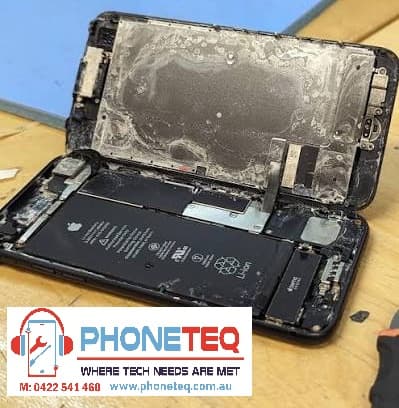
Water Damaged Phone Adelaide: What to Do First
Dropped your phone in water, spilled coffee on it, or got caught in heavy rain? The first few steps matter. Water damage can be unpredictable. Sometimes the phone works at first, then fails hours or days later due to corrosion inside.
At Phone Teq in Clearview, Adelaide, we inspect water-damaged phones and advise whether repair or data recovery is possible. The most important thing is to avoid making the damage worse.
Step 1: Turn the Phone Off
If the phone is still on, turn it off immediately. Do not keep using it to check messages, photos or apps.
Electricity and moisture do not mix. Keeping the phone powered on can increase the risk of short circuits inside the device.
Step 2: Do Not Charge It
Do not plug the phone into a charger. This is one of the most common mistakes after liquid damage.
Even if the charging port looks dry, moisture may still be inside the phone. Charging can cause more serious internal damage.
Step 3: Remove Case, SIM Tray and Accessories
Take off the phone case and remove any accessories. If possible, remove the SIM tray to help air escape.
Do not shake the phone aggressively, as this can push liquid deeper into the device.
Step 4: Wipe the Outside
Use a clean dry cloth to wipe the phone. Keep the phone upright if liquid entered through the charging port or speaker area.
Avoid using heat guns, hair dryers, ovens or direct sunlight. Too much heat can damage the battery, screen and internal parts.
Step 5: Do Not Put the Phone in Rice
Rice is a popular internet suggestion, but it does not properly clean corrosion or remove liquid trapped inside the phone. It can also leave dust or particles in ports and speakers.
The phone may appear to work after drying, but corrosion can continue inside.
Step 6: Get It Inspected Quickly
The sooner a water-damaged phone is inspected, the better the chance of saving it or recovering data. A technician can open the device, check for corrosion, clean affected areas, and test important functions.
Water damage repair is never guaranteed, but early action can make a big difference.
Common Signs of Water Damage
Your phone may have water damage if you notice:
No power
Screen flickering
Green lines or black display
Charging problems
Speaker or microphone issues
Camera fogging
Face ID or fingerprint issues
Overheating
Random restarting
Touch not working properly
Sometimes the phone works normally at first and then develops problems later.
Can a Water Damaged Phone Be Repaired?
It depends on the liquid type, how long the phone was exposed, whether it was charged afterward, and how much corrosion is inside.
Clean water exposure may be easier to treat than salt water, soft drink, coffee or alcohol. Sticky or corrosive liquids can cause more damage.
In some cases, the main goal may be data recovery rather than full repair.
Is the Phone Waterproof?
Many modern phones are water-resistant, not waterproof. Water resistance can reduce risk, but it does not guarantee protection. Age, previous repairs, cracks, pressure, heat and worn seals can reduce water resistance.
Even if your phone has a water resistance rating, it can still suffer liquid damage.
Local Water Damaged Phone Repair in Adelaide
Phone Teq is located in Clearview SA 5085 and helps customers across Adelaide with water damage inspection, cleaning, diagnostics and repair advice.
If your phone has been exposed to liquid, turn it off and contact us as soon as possible.
Call or text: 0422 541 460
Email: info@phoneteq.com.au
Website: www.phoneteq.com.au
FAQ
Should I put my wet phone in rice?
No. Rice does not properly remove internal moisture or corrosion. It is better to turn the phone off and get it inspected.
Can I charge my phone after water damage?
No. Do not charge a water-damaged phone until it has been inspected and confirmed safe.
Can water damage be fixed?
Sometimes, but it depends on the level of damage. Water damage repair is not guaranteed, and early inspection is important.
Can you recover data from a water-damaged phone?
In some cases, yes. If the storage and main board are not too badly damaged, data recovery may be possible.
PhoneTeq
PhoneTeq — Expert Mobile Repair & Tech Team